Regex in SQL Server 2025 & Azure SQL
In this blog, Christian explores how native regex in SQL Server 2025 and Azure SQL simplifies pattern matching, validation, and data transformation with practical examples.

SQL Server has been a widely used database for storing data since 1989, where text often plays an important role. Although SQL provides a lot of functionality for working with text, it took until the release of SQL Server 2025 before support for regular expressions, or regex, was introduced. In the past, I even built a CLR function (Common Language Runtime) to make this possible, but that is no longer necessary.
Anyone who has ever tried to find patterns in text, or wanted to use a check constraint to validate data, will recognize the problem. You start simple with a LIKE, maybe a CHARINDEX, and before you know it you end up with a tangle of SUBSTRING and nested REPLACE calls that are hard to follow.
With the introduction of native regex functionality in SQL Server 2025 and Azure SQL Database, this becomes much simpler: expressive and powerful patterns, directly in your queries.
In this blog, I will show what is possible, using practical examples based on the well-known AdventureWorks database.
From LIKE to regex
In the past, a “simple” validation would often look like this:
WHERE EmailAddress LIKE '%@%.%'A valid email address matches this pattern, but it also allows values such as:
- test@.
- @domain.com
- …@.............nl
Regex approaches this in a fundamentally different way: you describe the full pattern, rather than matching separate pieces of text.
The new regex functions at a glance
The main additions:
- REGEXP_LIKE → validates whether a string matches a pattern
- REGEXP_SUBSTR → extracts a match from a string
- REGEXP_REPLACE → replaces parts of a string
Let’s look at a few concrete scenarios based on the AdventureWorks2025 sample database.
1. Email validation
Validating email addresses is a common scenario.
SELECT EmailAddress
FROM Person.EmailAddress
WHERE NOT REGEXP_LIKE(EmailAddress, '^[A-Za-z0-9._%+-]+@[A-Za-z0-9.-]+\.[A-Za-z]{2,}$');
Result:
- We select all email addresses that do not match the pattern
- Useful for data quality checks
This regex is not complete, but it does show how easily you can use regex to perform these kinds of validations.
2. Extracting domains
You may want to gain insight into which domains appear in your dataset.
SELECT REGEXP_SUBSTR(EmailAddress, '@(.+)$') AS Domain,
	COUNT(*) AS Count
FROM Person.EmailAddress
GROUP BY REGEXP_SUBSTR(EmailAddress, '@(.+)$')
Result:
- An overview of the different domains and how often they occur
- Ideal for reporting
3. Data anonymization (GDPR-proof)
To prevent personal data from ending up in test and development environments, anonymization is often applied. Using the REGEXP_REPLACE function, you can for example mask email addresses.
SELECT EmailAddress,
       REGEXP_REPLACE(EmailAddress, '(^.).*(@.*$)', '\1***\2') AS Masked
FROM Person.EmailAddress;
Result:
- The first letter remains visible
- The domain stays intact
- The middle part is replaced
Ideal for:
- Test data
- Logging and auditing
4. Filtering complex product codes
Regex is also well suited for working with structured codes. Think of formats like Dutch postal codes or product codes, such as those in the AdventureWorks database.
SELECT Name, ProductNumber
FROM Production.Product
WHERE REGEXP_LIKE(ProductNumber, '^[A-Z]{2}-?[0-9]{4}$');
Result:
- Two uppercase letters
- An optional hyphen
- Four digits
5. Data cleaning
Suppose you only want to keep letters:
SELECT FirstName,
       REGEXP_REPLACE(FirstName, '[^A-Za-z]', '-') AS CleanName
FROM Person.Person;
Everything that is not a letter is replaced with a hyphen.
Without regex functionality, this would quickly turn into a messy statement with multiple nested REPLACE chains or a common table expression.
6. Check constraints
In addition to using regex in queries, you can also apply regex functions in check constraints to ensure that data in your table matches a specific pattern. For example, validating a Dutch phone number.
ALTER TABLE Person.Person
ADD CONSTRAINT CK_Person_Phone_Format
CHECK (
    REGEXP_LIKE(PhoneNumber, '^(\+31|0)[0-9]{9}$') = 1
);
A significant step forward
When you compare these examples to the old approach, three clear advantages stand out:
1. Less code
What used to take five to ten (or more) lines of code can now be expressed in a single statement.
2. Better readability
You describe what you are looking for, instead of how to find it.
3. Fewer bugs
Regex forces you to be explicit about patterns and can be tested independently from your database.
Performance
Regex is not known for its speed. Complex patterns can be CPU-intensive. In some scenarios, a simple LIKE may therefore perform better than a regex.
Microsoft has put significant effort into improving performance compared to the initial implementations in Azure SQL Database. For example, indexes are now utilized more effectively and CPU usage has been reduced.
When I run the earlier email check on a table with nearly 20,000 records, the execution plan shows no noticeable difference between the regex solution and the LIKE approach. The client statistics are also very similar.
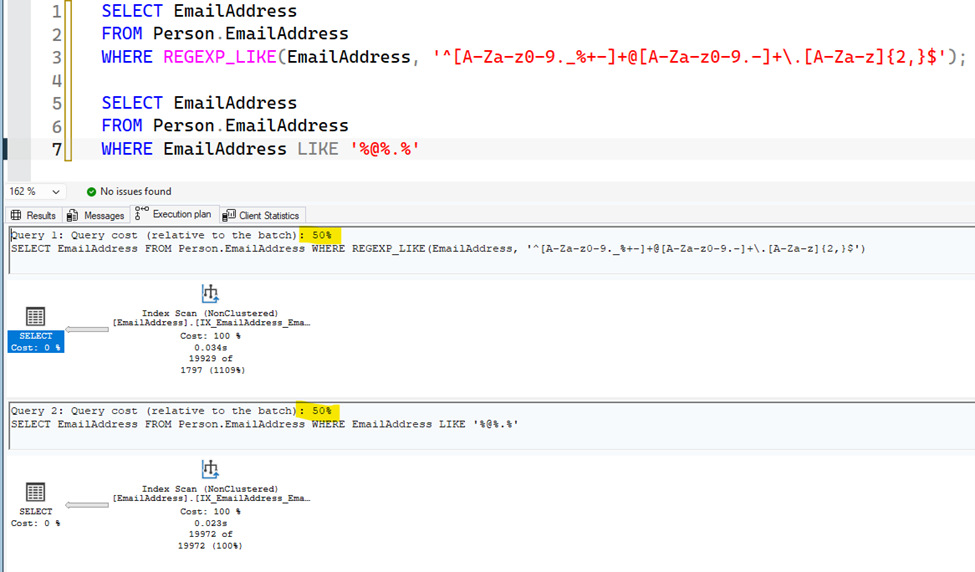
“It depends” definitely applies here. Depending on your data and your regex, you will need to evaluate whether regex is the right solution.
Conclusion
With native regex support in SQL Server 2025 and Azure SQL Database, SQL now has a mature way of working with text patterns.
What previously required complex workarounds is now more expressive, easier to maintain, and less error-prone.
For anyone working regularly with data quality, ETL, or string manipulation, this is not a small improvement, but a fundamental step forward.
Want to learn more?
If you would like to learn more about SQL Server, feel free to contact us or discuss your specific situation.
More blog posts
-
Privacy by Design
How do you develop software that complies with the GDPR? In this blog, you'll discover the eight principles of Privacy by Design and learn how to protect personal data from the start.Content typeBlog
-
Get more done with C# pattern matching
This blog provides a practical overview of C# pattern matching and shows how modern patterns can help make code more concise, readable, and maintainable.Content typeBlog
-
Storing JSON data in SQL databases
This blog explores how JSON data can be stored and processed within SQL Server and Azure SQL Database, and how the built-in JSON functionality enables flexible handling of schemaless data without constant database schema changes.Content typeBlog
Stay up to date with our tech updates!
Sign up and receive a biweekly update with the latest knowledge and developments.