Storing JSON data in SQL databases
In this blog, Christian explains how JSON data can be stored and processed within SQL Server and Azure SQL Database. He shows how the built-in JSON functionality of SQL Server makes it possible to work flexibly with schemaless data.

JavaScript Object Notation, or JSON, is a widely used format for data exchange. As the name suggests, JSON originally started as the notation used for objects in JavaScript. Today, however, it has evolved into a standard format for data exchange between systems, regardless of the programming language being used.
JSON is a text-based format, which makes it human-readable and self-describing. In that sense, it is similar to XML, which was the standard for data exchange for many years. Because JSON is more compact and often easier to work with, especially in JavaScript applications, its popularity has grown significantly and it has replaced XML in many scenarios.
The step from data exchange to data storage is relatively small. After all, JSON is essentially just text. Databases can store this type of data without any issues, but challenges arise once you need to search within the data or modify specific values.
SQL Server and Azure SQL Database, therefore, provide functionality for working effectively with JSON data. With a relatively small set of functions, you can read, modify and process JSON within a relational database in many different ways.
Schemaless
SQL Server databases have a well-defined schema. A table has a fixed number of columns, predefined column names and specific data types that determine what kind of data can be stored, such as text, numbers or dates.
JSON data is much more flexible in this regard. For example, you can have a list of objects where each object contains different properties.
{"employees":[
  { "firstName":"John", "lastName":"Doe", "Manager":"Peter Jones"},
  { "firstName":"Anna", "lastName":"Vries", "Middlename":"de", "Age":"40"},
  { "firstName":"Peter", "lastName":"Jones" , "Offices": ["Eindhoven", "Amsterdam"] }
]}
In this example, each employee contains different properties. Within JSON this is completely valid, but in a SQL database it introduces challenges. Relational databases are built around a fixed schema.
That is exactly why storing JSON data directly in the database can be interesting, instead of first converting it into a traditional table structure with fixed columns.
JSON in SQL databases
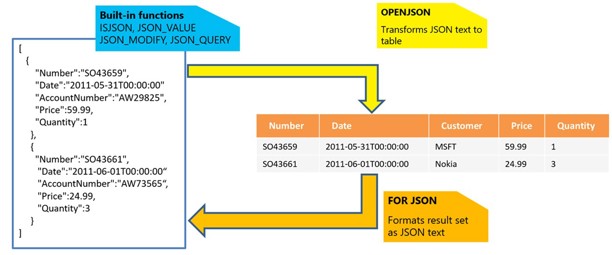
Below is an overview of the JSON support available in SQL Server and Azure SQL Database. Most of the interesting functionality can be found in the blue section: the built-in functions. Before taking a closer look at those, let’s first look at FOR JSON and OPENJSON.
FOR JSON
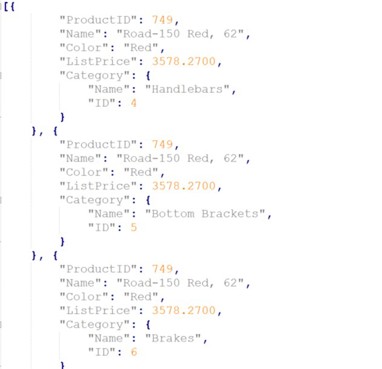
By adding FOR JSON to a query, the result is no longer returned as a table, but as a JSON array. Take a look at the query below, paying special attention to the last line.
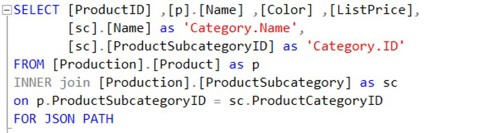
The addition of PATH, combined with the two column aliases, ensures that Category becomes a child object within the product object.
OPENJSON
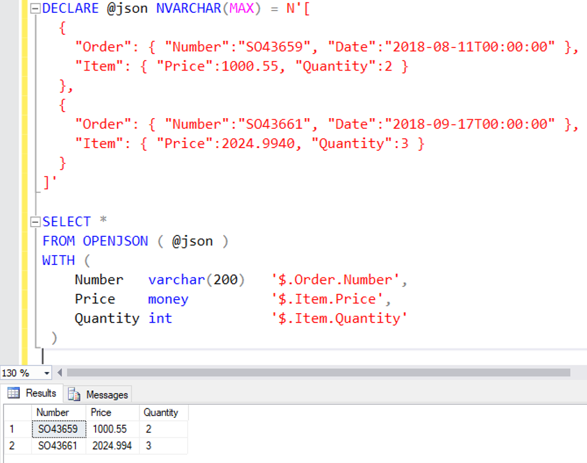
OPENJSON is essentially the opposite of FOR JSON. While FOR JSON converts a table structure into JSON, OPENJSON allows JSON data to be represented as a table structure.
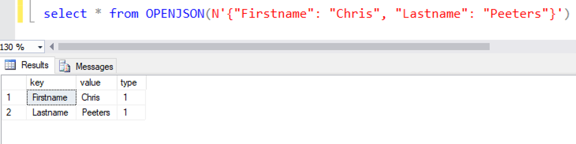
By adding a WITH statement, you can precisely define which values from the JSON should be used. In this example, a variable is used, but this could just as easily be data stored in a database column.
Built-in functions
SQL Server provides four built-in JSON functions. These functions allow you to work effectively with JSON data, while the data itself is simply stored as plain text in an NVARCHAR column.
The examples below use a Users table with a single column called User. This column contains JSON objects with information about users.
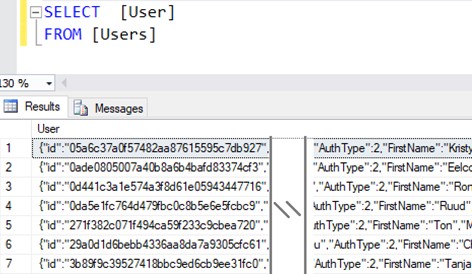
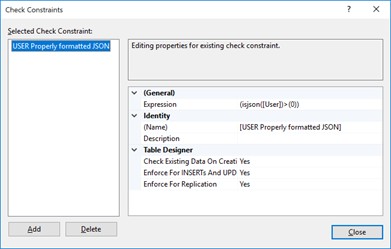
For example, the ISJSON() function can be used as a CHECK constraint on a table. The user objects may contain different properties, but the content must still be valid JSON. A constraint like the one below can be added for this purpose.
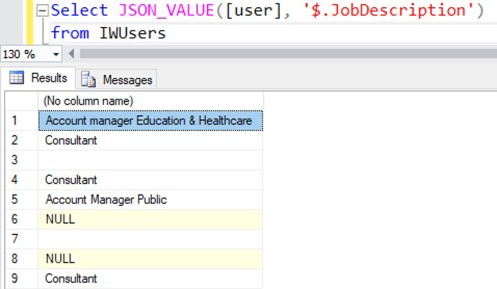
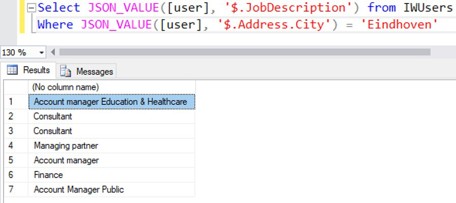
With JSON_VALUE(), you can retrieve a specific value, for example the JobDescription property of a user. Some objects may contain an empty value and others may not contain the property at all, but the query still returns a clear and consistent result in all cases.
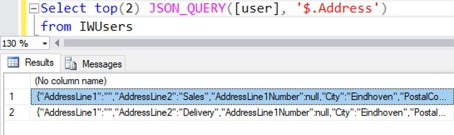
The JSON_QUERY() function is very similar to JSON_VALUE(), since both are used to retrieve data from JSON. The difference is that JSON_VALUE() returns a single value, while JSON_QUERY() returns an object or array. For example, this can be used to retrieve the Address child object of a user.
JSON functions can be used not only in the SELECT list, but also in clauses such as WHERE and ORDER BY.
Indexing
The performance of these queries is generally quite good. In any case, they are faster and less error-prone than trying to filter JSON data manually using LIKE '%...%'. Still, there are scenarios where the performance benefits of indexes are necessary.
Because JSON is stored as text, it is not directly possible to create an index on a specific property within a JSON object. However, this can be solved effectively using so-called persisted computed columns.
A computed column calculates its value based on an expression or function, such as a JSON_VALUE() function. By also defining the computed column as PERSISTED, the calculated value is physically stored in the table. This allows the column to be indexed and even used for primary and foreign keys.
In the example below, the User column is accompanied by two persisted computed columns: Id and Email.
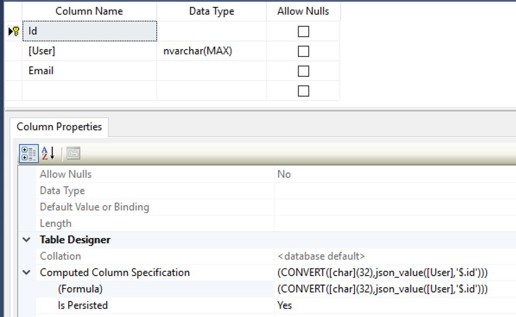
When a JSON object in the User column is inserted or updated, the values of Id and Email are automatically updated as well. By creating indexes on these columns, searches and joins based on properties from the JSON object can be executed very efficiently.
Use cases
There are several scenarios where working with JSON in a database can be interesting:
- A web application or service (Web API) works with JSON objects. Instead of constantly parsing or serializing objects, you can store, retrieve and return them directly.
- The objects do not have a fixed schema, or the schema changes regularly. This makes it difficult to store the data in traditional SQL tables.
- There is a need for a NoSQL-like solution, while still wanting to use SQL Server, for example because the rest of the data is already stored there.
- Normalizing data can result in very complex and slow joins, because data from dozens of tables needs to be combined to build a single entity.
- SQL Server offers functionality that is missing in some NoSQL databases.
- You have extensive knowledge of T-SQL and want to continue using that knowledge.
I have personally used this functionality within a SaaS solution. The product was offered to thousands of customers, each with their own database, partly for security and maintenance reasons.
With large numbers of databases, schema changes quickly become a challenge. For example, adding an extra column for a new feature can become a significant operation. By using JSON, that problem becomes much smaller. New objects can simply receive an additional property, without requiring changes to the database schema itself.
Want to learn more about SaaS solutions, Azure or SQL Server?
If you would like to learn more, feel free to contact us or discuss your specific situation.
More blog posts
-
Privacy by Design
How do you develop software that complies with the GDPR? In this blog, you'll discover the eight principles of Privacy by Design and learn how to protect personal data from the start.Content typeBlog
-
Get more done with C# pattern matching
This blog provides a practical overview of C# pattern matching and shows how modern patterns can help make code more concise, readable, and maintainable.Content typeBlog
-
Regex in SQL Server 2025 & Azure SQL
SQL Server 2025 introduces native regex support, simplifying pattern matching, validation, and data transformation with more readable, maintainable, and powerful queries compared to traditional string functions.Content typeBlog
Stay up to date with our tech updates!
Sign up and receive a biweekly update with the latest knowledge and developments.