Get more done with C# pattern matching
This blog provides a practical overview of C# pattern matching and shows how modern patterns can help make code more concise, readable, and maintainable.

C# has been around for over twenty-five years and has evolved significantly during that time. The language has gained many features, such as generics, async and await, LINQ, auto-properties, records, top-level statements, and global usings.
Code written in the early days still works just fine, but that doesn’t mean the language has stood still. Quite the opposite. In recent years, many features have been added that help you write code that is shorter, clearer, and more productive.
If you’ve been working with C# for a while, chances are you rely mostly on syntax you’re already familiar with. As a result, you may be missing improvements that can actually simplify your code.
Pattern matching is a good example of this. Especially when combined with switch expressions, it often leads to immediate gains in readability and maintainability.
Switch syntax
Let’s start with the familiar switch. Just like with methods, C# allows you to reduce a lot of boilerplate by using arrow syntax, also known as switch expressions. These were introduced in C# 8.
Below you’ll see the same implementation twice. The switch expression is more compact and makes the intent immediately clear.
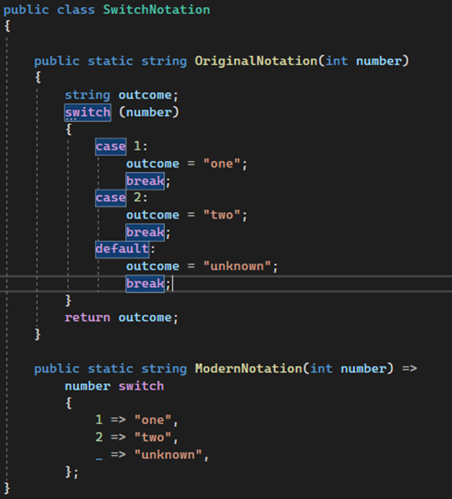
The code is mostly self-explanatory, but one detail is worth highlighting: the underscore “_” in the lower switch.
In C#, _ is a discard. This is an intentionally unused variable. You might use it, for example, when calling a method but you’re not interested in the return value.
Within a switch statement, a discard means “match anything,” including null. So if number is not equal to 1 or 2, it will match the discard and return "unknown". This is comparable to the default case in the example above.
We’ll encounter discards again later in a different form when we look at list pattern matching.
Type pattern matching
What is pattern matching? At its core, it’s about checking whether an expression, such as a variable, meets certain conditions. This can be a specific value, but also a property like its type.
In the earlier example, we compared a variable to a single value. But you can also match on other characteristics, such as the type of an object.
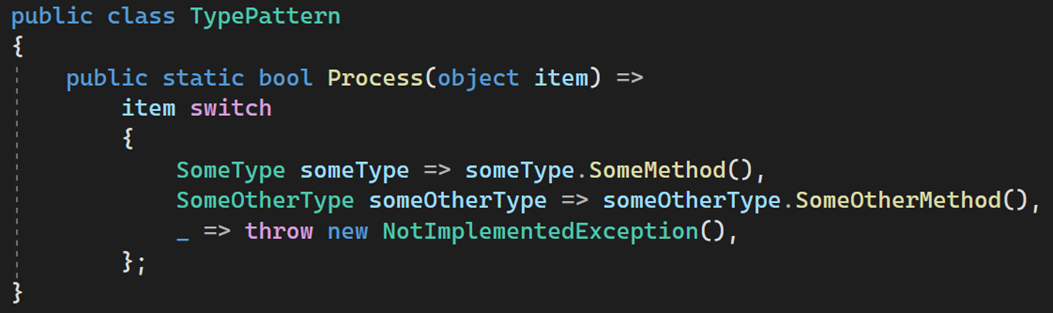
Depending on the type of item, a different method is called. By adding a name directly after the type, a variable of that type is automatically created.
The variable someType refers to the same object as item, but already cast to SomeType. This means an explicit cast is no longer needed.
Relational and logical pattern matching
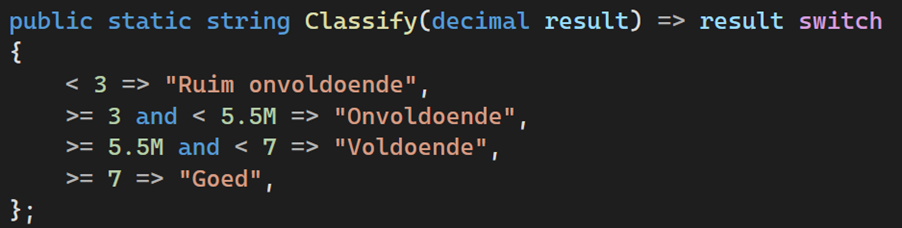
Sometimes you don’t want to check for a single specific value, but whether a value falls within a certain range. That’s where relational pattern matching comes in.
In the example below, we compare the expression result using operators such as <, >, <=, and >=.
You can combine this with logical pattern matching. Using and and or, you can easily define combinations, for example to check whether a value falls within a specific range.
Property pattern matching
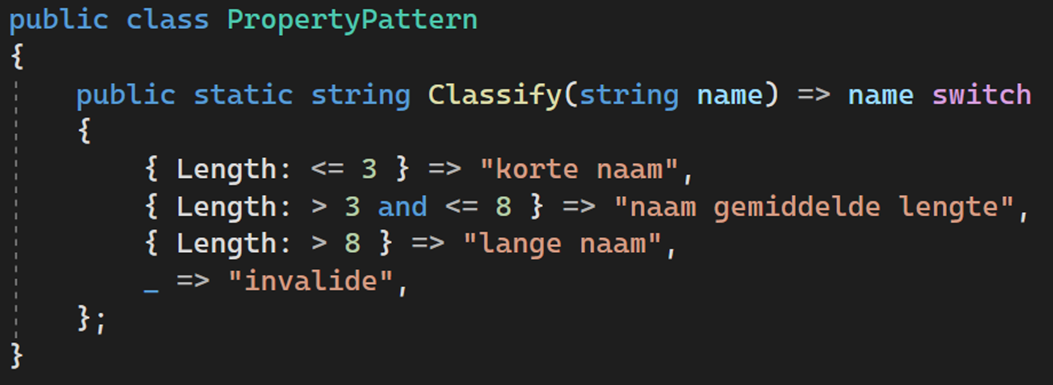
So far, we’ve looked at simple values. With property pattern matching, you can also use properties of objects in your match.
In the first example, we look at the Length of the string name.
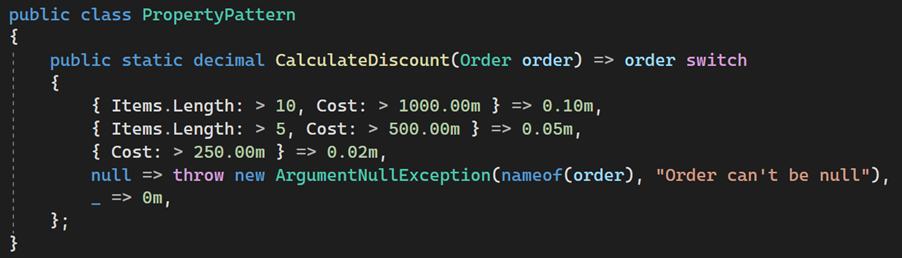
We can take this a step further by working with a more complex type. In the next example, we use an Order object with the properties Cost and Items. Items is an array of type OrderDetails, which itself contains two properties.

With pattern matching, you can use these properties directly to apply business rules. In the example below, the discount is determined based on the number of order lines and the value of Cost.
Positional pattern matching
In the previous examples, we worked with a single expression to match against a pattern. With positional pattern matching, you can combine multiple inputs.
These inputs form a tuple, where you can define a pattern for each position.
In the example below, we use two variables: groupSize and visitDate. The first input for the switch is groupSize. From visitDate, we use the DayOfWeek as the second input.
The patterns now match on two positions:
- Groups smaller than or equal to 0 result in an error, regardless of the day
- In the weekend, there is no discount, regardless of group size
- Groups of 5 to 9 people receive a 20 percent discount on Monday, larger groups receive 30 percent
- On other days, this is 12 and 15 percent respectively
- In all other cases, there is no discount
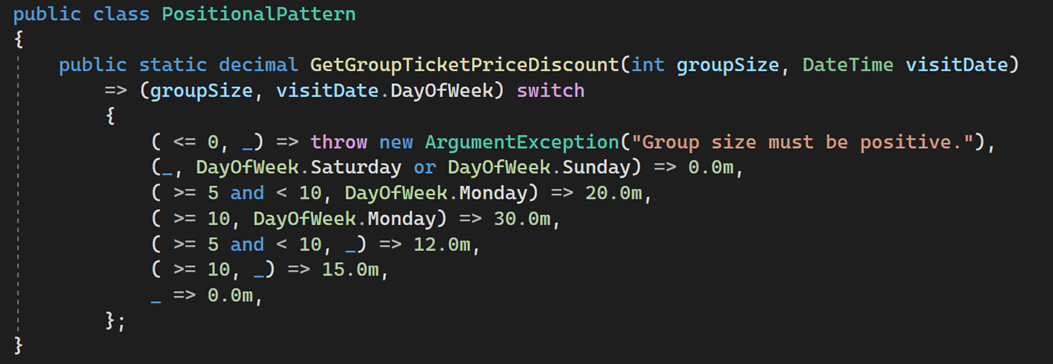
Because there is only a single semicolon (;), all of this logic is contained within one expression. In a single line, a fairly complex piece of business logic is defined.
Var pattern matching
We can combine positional pattern matching with var pattern matching. By using the var keyword, you can create a new variable directly within a pattern and use it later on.
This is useful, for example, for intermediate calculations. In the example, we use an Order with two properties. The first is stored in the variable items and the second in cost. We then use the Amount of the items to perform an aggregation and compare it to cost.

For completeness, here’s a brief explanation of the statement after the => arrow.
Order is defined here as a record. With the “with” keyword, you create a copy of order, modifying a single property. In this case, Cost is replaced with a new value: in one case the sum of the amounts, and in the other case 0.
This way, you can easily perform a transformation on the Order object without modifying the original instance.
List pattern matching
In addition to values and objects, you can also match collections against patterns. This is called list pattern matching and was introduced in C# 11.
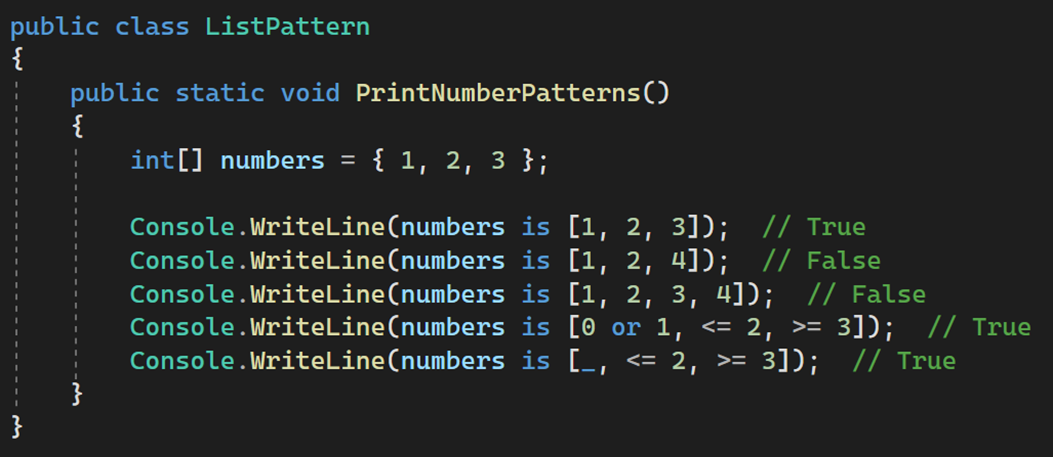
In the example below, you can see how an array numbers is matched against several patterns. This can be combined with relational- and logical pattern matching, allowing you to define fairly complex patterns.
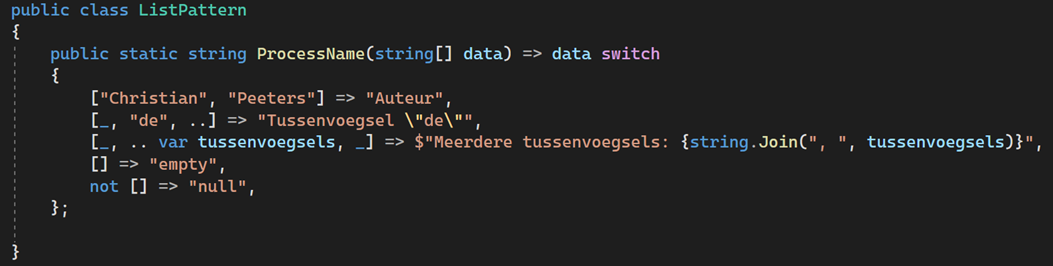
This does not only work with numbers, but also with other types. In the next example, we use strings.
In the second pattern, the discard “_” is used to match exactly one element. The two dots “..” represent the range operator and indicate zero or more elements.
In the third pattern, the sequence between the first and last element is stored in the variable tussenvoegsels, which can be used again after the arrow.
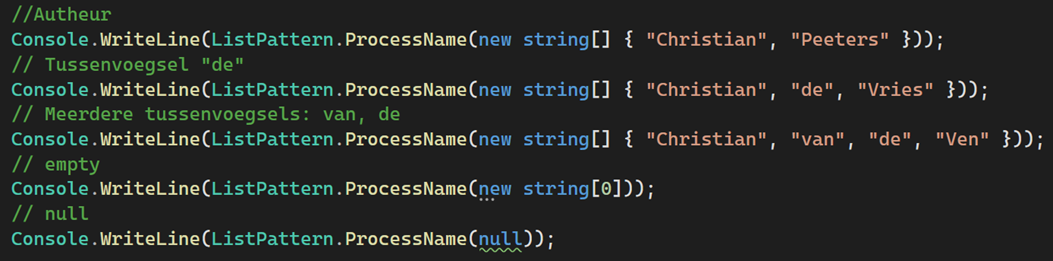
Below you can see the output for the different calls to the ProcessName method.
Finally, let’s look at a practical example: parsing a CSV (Comma Separated Value).
The input data is not well structured. Lines with “WITHDRAWAL” contain extra columns, while lines with "INTEREST" and “FEE” contain fewer columns. Still, we want to process this data and calculate a balance.
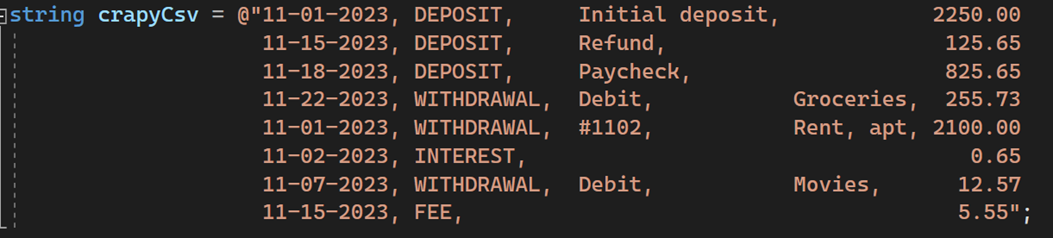
In the method below, the lines are split on commas. Using list pattern matching, we determine the type of operation for each line and store the relevant value in the variable amount. This value is then parsed to a decimal and applied to the balance.
All of this without complex parsing logic or nested if statements.
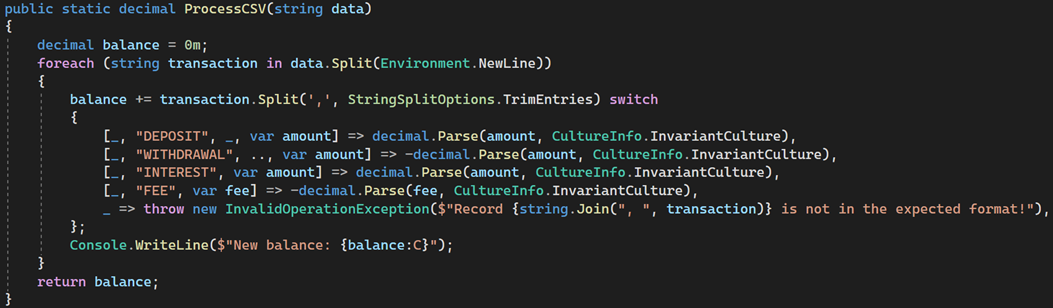
Pattern matching proves to be not only powerful, but also highly readable.
Hopefully, this overview gives you a good sense of what’s possible. Pattern matching helps you write code that is more compact and easier to maintain. And with new additions in almost every C# release, it remains a feature worth keeping up with.
The examples in this blog can also be found on GitHub.
Looking for more information about Microsoft solutions, C#, or .NET?
If you would like to learn more, feel free to contact us or discuss your specific situation.
More blog posts
-
Privacy by Design
How do you develop software that complies with the GDPR? In this blog, you'll discover the eight principles of Privacy by Design and learn how to protect personal data from the start.Content typeBlog
-
Storing JSON data in SQL databases
This blog explores how JSON data can be stored and processed within SQL Server and Azure SQL Database, and how the built-in JSON functionality enables flexible handling of schemaless data without constant database schema changes.Content typeBlog
-
Regex in SQL Server 2025 & Azure SQL
SQL Server 2025 introduces native regex support, simplifying pattern matching, validation, and data transformation with more readable, maintainable, and powerful queries compared to traditional string functions.Content typeBlog
Stay up to date with our tech updates!
Sign up and receive a biweekly update with the latest knowledge and developments.